Designing a Botanic Square Garden Flyer: A Complete Guide
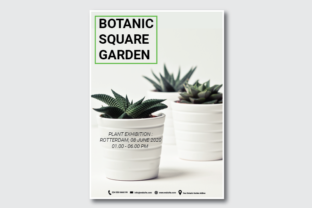
Creating a flyer for the Botanic Square Garden is more than just designing a visually appealing layout—it's about conveying information clearly and effectively to attract visitors. Whether you're a graphic designer, a marketing professional, or simply someone passionate about botany, understanding how to create an impactful flyer can significantly enhance your communication efforts. In this article, we’ll explore the key elements of a Botanic Square Garden flyer, including design specifications, layout considerations, and practical tips to ensure your flyer stands out in both print and digital formats.
Understanding the Botanic Square Garden Flyer
The Botanic Square Garden flyer serves as a promotional tool to inform the public about the garden’s features, events, and activities. It plays a crucial role in attracting visitors, especially those who may not be familiar with the location or its offerings. A well-designed flyer should be informative, engaging, and easy to read, even from a distance.
A typical Botanic Square Garden flyer includes essential elements such as:
- Title: A clear and eye-catching headline that highlights the main attraction or event.
- Visuals: High-quality images of the garden, plants, or events to capture attention.
- Location and Hours: Clearly stated details so potential visitors know where to go and when.
- Event Details: Information about special events, workshops, or exhibitions taking place.
- Contact Information: Ways to reach out for more details or to make reservations.
Design Specifications for Print Ready Flyers
To ensure your Botanic Square Garden flyer looks professional and is suitable for printing, it's important to follow specific design guidelines. One popular choice is using the Adobe Illustrator file format at 300 DPI (dots per inch), which ensures high-quality output. The flyer should be sized at 21cm x 29.7cm, which is the standard A4 size. This allows for proper printing and distribution without distortion or pixelation.
In addition to the physical dimensions, it's essential to consider the bleed area, which is typically 0.25cm on all sides. This ensures that the design extends beyond the trim edge, preventing any white space from appearing after cutting. When designing in Adobe Illustrator, always set up your document with bleed and trim marks to maintain consistency and professionalism.
The color mode should be set to CMYK rather than RGB. CMYK is the standard for print media and ensures accurate color reproduction. Using RGB colors may result in unexpected color shifts when printed, which can negatively impact the overall appearance of your flyer.
Choosing the Right Font: Roboto Free
Typography plays a vital role in the readability and aesthetics of your Botanic Square Garden flyer. The Roboto Free font is a popular choice due to its clean, modern look and excellent legibility. It is widely used in both web and print designs because of its versatility and adaptability across different sizes and styles.
Roboto Free supports multiple languages, making it ideal for international audiences. Its geometric structure provides a balanced and professional appearance, which is particularly useful for informational flyers. However, it's important to use the font consistently throughout the design to maintain visual harmony.
When using Roboto Free, it's recommended to pair it with a complementary sans-serif font for headings or titles. This creates a visual contrast that enhances readability while maintaining a cohesive design. For example, you could use a bold version of Roboto for headlines and a lighter weight for body text.
Layout and Visual Hierarchy
A well-structured layout is essential for guiding the viewer’s eye through the flyer. Start by dividing the page into sections based on the content you want to highlight. Typically, a Botanic Square Garden flyer will have the following sections:
- Header: Contains the title and a striking image or logo.
- Main Content Area: Includes event details, location, hours, and additional information.
- Footer: Contains contact details, website links, and social media icons.
Use visual hierarchy to emphasize important information. Larger fonts and bold text can draw attention to key details such as event dates or special offers. On the other hand, smaller fonts are appropriate for less critical information like address or map directions.
Whitespace is also an important element in flyer design. Avoid cluttering the layout with too much text or images. Instead, use ample spacing to improve readability and give the design a clean, organized feel. This is especially important for print materials, where overcrowding can lead to eye strain and reduce the effectiveness of the message.
Practical Tips for Creating an Effective Flyer
Creating a successful Botanic Square Garden flyer involves more than just following design specifications—it requires careful planning and execution. Here are some practical tips to help you along the way:
- Plan Your Content: Before starting the design process, outline the key messages you want to convey. This will help you stay focused and ensure that all necessary information is included.
- Use High-Quality Images: Choose images that reflect the beauty and diversity of the garden. Ensure they are high resolution and relevant to the content of the flyer.
- Keep It Simple: Avoid overcomplicating the design. A simple, clean layout is often more effective than one that is overly complex.
- Test Print Quality: Always print a sample copy to check the color accuracy, alignment, and overall appearance before mass production.
- Include Call-to-Action: Encourage visitors to take action by including clear instructions such as “Visit us today” or “Register now for our event.”
By following these tips, you can create a Botanic Square Garden flyer that is both informative and visually appealing. Whether you're promoting a seasonal event or showcasing the garden’s unique features, a well-designed flyer can make a significant difference in attracting visitors and enhancing the overall experience.
Conclusion
Designing a Botanic Square Garden flyer is a valuable skill that combines creativity with practicality. By understanding the key elements of a flyer, following design specifications, and using the right tools and fonts, you can create a professional and effective promotional material. Whether you're a beginner or an experienced designer, the principles outlined in this guide can help you produce a flyer that stands out and makes an impact.
Remember, the goal of a flyer is not only to inform but also to inspire. With the right approach, your Botanic Square Garden flyer can become a powerful tool for connecting with your audience and promoting the wonders of nature.